
How to Increase Your Transfer Limit on Zenith Bank

If you bank with Zenith Bank and find that your daily transfer limit is too low, you’re not alone. Many customers quickly outgrow the standard limits imposed on basic channels like USSD, the mobile app, or internet banking.
Fortunately, Zenith Bank offers secure ways to raise these limits so you can move more money for business, bills, or life’s big payments.
This article explains why limits exist, what your current limits might be, and step by step how to increase them.
Why Does Zenith Bank Have Transfer Limits?
Before diving into solutions, it helps to understand why limits are in place in the first place. Like all Nigerian banks,
- Zenith Bank Sets base transaction ceilings on channels like USSD and mobile banking for security and fraud protection.
- Requires stronger authentication (tokens or debit card linkage) before allowing larger transfers.
- Aligns with regulatory requirements and internal risk controls.
So if you’re seeing limits, it’s not arbitrary it’s part of the bank’s effort to keep your money safe.
Typical Zenith Bank Transfer Limits (Baseline)
Different banking channels have different default limits. A breakdown from Zenith’s own mobile banking FAQ illustrates this:
Channel
- Typical Daily Transfer Limit
*996# USSD Code
₦100,000 by default¹ - Zenith Mobile App (with ATM card)
₦100,000 by default
Zenith Mobile App (branch activated)
₦2,000,000
Zenith Mobile App (hardware token or e- token)
₦5,000,000 – ₦25,000,000

- Internet Banking (token/e- token)
Often very high or “unlimited” per specific conditions
These figures show that security level and channel determine your starting point but you can modify them.
Increase USSD Transfer Limit (Basic Step)
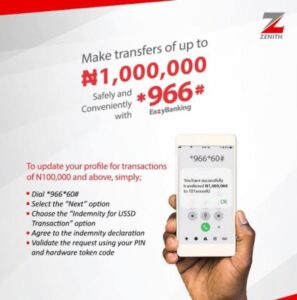
For many customers, the first step is improving the limit on *USSD (966#) banking.
By default, the Zenith *966# Eazy banking code allows a maximum of ₦100,000 daily transfers.
How to Raise USSD Limit
On your registered phone number, dial *966*60#.
Follow the on-screen prompts.
You may be given an option to increase the transaction limit up to around ₦1,000,000, though this higher level will still depend on verification options.
This step is usually all you need for moderate increases on USSD especially for customers without tokens or full mobile banking access.
Use the Zenith Mobile App for Higher Limits
The Zenith Mobile App (sometimes called Zenith Mobile or Zenith Bank app) offers much higher ceilings, but you must ensure your authentication method is set up correctly.
Authentication Options and Limits
According to Zenith’s own documentation.
Debit Card Authorization:
₦100,000 daily limit.
Branch Registration + OTP: Up to ₦2,000,000.
Hardware Token / E-Token: ₦5,000,000 to ₦25,000,000.
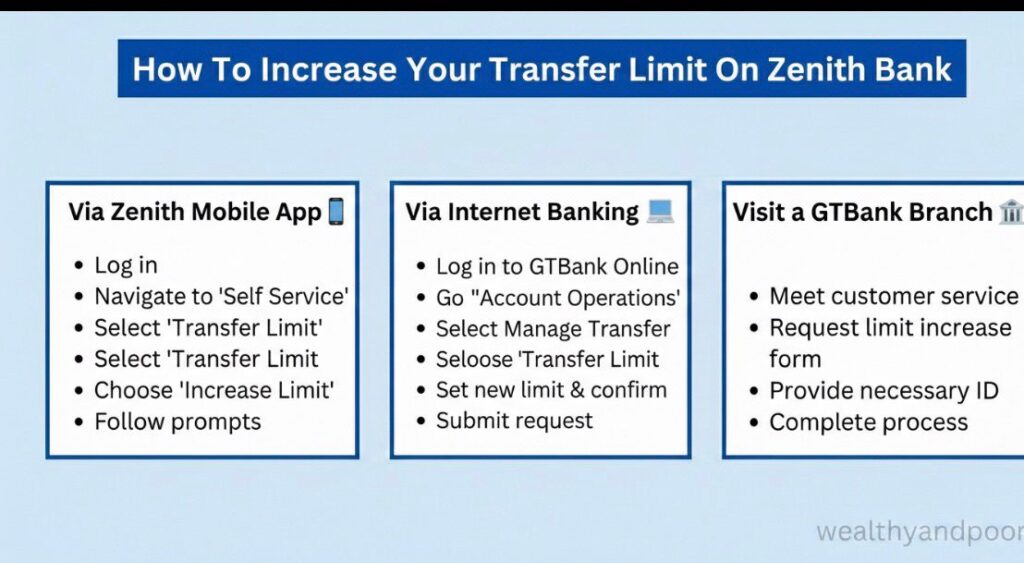
Steps to Increase within the App
- Open the Zenith Mobile App and sign in securely.
- Go to Settings > Transfer Limit.
- Choose how to authenticate either with your debit card, OTP, or token.
- Accept the terms and choose your new desired limit.
- Authorize using the selected method (card, OTP, or token).
This means that if your app is currently limited to low value transactions, you can expand your limit in seconds by choosing a stronger authentication mode.
- Get a Token (Hardware or e-Token)
For the most significant increases especially for business or large personal transfers, Zenith Bank requires stronger authentication:
Token Options
Hardware Token: A physical security device issued at Zenith branches.
E- Token App: A mobile app that generates one time authorization codes.
Once you have a token linked to your account:
Your app limit can jump into the multi-million naira range.
You can authenticate larger transfers securely.
How to Get a Token
- Visit any Zenith Bank branch customer service desk.
- Ask for a hardware token application form.
- Fill it out and receive your token (or instructions for e-token setup).
- Follow the bank’s setup guide for linking it to your mobile or internet banking.
This is typically the most effective way to raise your limits for high-value daily transfers.
Use Internet Banking for Maximum Limits
While many customers focus on mobile or USSD, Zenith Internet Banking accessed via web provides the strongest transaction authentication.
Users with a linked token (hardware or e- token) often find their daily transfer capacity significantly higher sometimes effectively unlimited within regulatory controls.
Hence If you’re not yet registered for Zenith Internet Banking:
- Visit Zenith Bank’s official internet banking portal.
- Register using your account number and details.
- Follow prompts to link your token for secure transfers.
This channel is ideal for business owners, corporate accounts, or anyone needing very high daily transfer capacity.
Tips for Smooth Limit Increases.
- Ensure your BVN and account details are up to date.
- Updated KYC often supports higher limits.
- Use a registered phone number the one linked to your Zenith Bank account when dialing USSD codes.
- Visit a branch if in-app options fail. Branch staff can help link tokens or update authentication.
- Contact Zenith Customer Service for support.
Conclusion
Increasing your transfer limit on Zenith Bank is not only possible it’s straightforward if you choose the right banking channel and authentication method.
Use the USSD code *966*60# to raise basic limits up to around ₦1,000,000 daily.
Set up and use the Zenith Mobile App with stronger authentication for much higher limits.
Obtain a hardware token or e -token to unlock multi-million naira transfer capability.
Use Internet Banking like Gt mobile banking with token authentication for maximum flexibility.
With these steps, you’ll be able to manage larger payments easily whether for personal needs, business, or daily banking.












Comments