
Common GTBank Error Codes

In today’s digital age, banking in Nigeria has become faster and more convenient with platforms like Guaranty Trust Bank’s (GTBank) mobile app (GTWorld), USSD (*737#), internet banking, and ATMs. However, many users still encounter error codes and messages during transactions — such as “X00024” — that interrupt payments or transfers.
For most Nigerians, seeing an error code during a transfer, bill payment, or ATM withdrawal can be confusing and stressful — especially when money is debited but the transaction fails. Despite their prevalence, these error codes are often misunderstood. They are not arbitrary; each code communicates a specific issue in GTBank system, whether it relates to network problems, insufficient funds, invalid account details, or system maintenance.
This article dives deep into the most common GTBank error codes in Nigeria, explaining what each code means, why it occurs, and, most importantly, how you can fix it quickly. Whether you are using the mobile app, USSD, ATM, or POS, this guide will help you navigate these errors with confidence, reduce transaction failures, and ensure smoother banking experiences. An error code appears when a transaction cannot be completed successfully.
Common causes include:
- Temporary system maintenance
- Network connectivity issues
- Exceeded transaction limits
- Insufficient funds
- Incorrect beneficiary details
- Interbank routing delays
Common GTBank Error Codes and What They Mean
- Temporary System or Network Issue: This is one of the most referenced GTBank error codes. The bank’s system cannot process your transaction due to temporary issues such as system downtime, high traffic, or network delays.
Causes:
- GTBank server maintenance
- High transaction volume on NIBSS
- Slow internet connectivity
Solution:
- Wait a few minutes and retry
- Switch from Wi-Fi to mobile data or vice versa
- Try a different channel (e.g., USSD if the app fails)
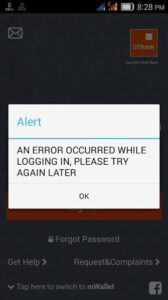
- Transaction Failed / General Failure: The transaction could not be completed.
Causes:
- Insufficient funds
- Invalid account details
- System timeout
Solution:
- Confirm your available balance
- Verify beneficiary account details
- Avoid rapid retries; check transaction history first
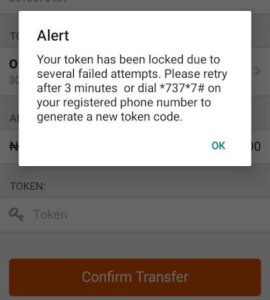
Authentication Failed / Invalid PIN: Your authentication failed during a USSD or mobile app transaction.
Causes:
- Wrong USSD PIN
- Incorrect GTWorld password
- Expired session
Solution:
- Re-enter the correct PIN
- Reset via the GTWorld app if necessary
- Contact GTBank customer care for persistent issues
Service Temporarily Unavailable: The requested service is offline.
Causes:
- System maintenance
- Unexpected service outages
- Network provider issues
Solution:
- Wait and retry later
- Use a different banking channel, e.g., USSD, app, or ATM
- Monitor GTBank announcements for updates
Invalid Account Details: The beneficiary account number or bank does not match GTBank records.
Causes:
- Typing errors in the account number
- Wrong bank selected
- Closed or inactive beneficiary account
Solution:
- Double-check the account number and bank name
- Confirm details with the recipient
- Retry the transaction carefully
Duplicate Transactions Detected: The system suspects you are repeating the same transaction.
Causes:
- Multiple retries in a short time
- Slow confirmation from previous attempts
Solution:
- Stop retrying immediately
- Check your transaction history
- Wait before attempting again
ATM / POS Specific Errors (Dispense Failures): Sometimes money is debited but not dispensed at ATMs or POS devices.
Causes:
- ATM malfunction
- Communication failure between GTBank and NIBSS
- POS device issues
Solution:
- Wait for automatic reversal (24–72 hours)
- Contact GTBank via *737# support, GTConnect, or visit a branch
- Provide transaction details including time, amount, and reference number
Why GTBank Errors Happen More During Certain Times
Transactions may fail more often during:
- Late evenings
- Salary days
- Weekends and public holidays
This is usually due to high system traffic or scheduled maintenance. USSD services are also influenced by telecom networks, so poor signal strength can cause errors even when GTBank system is functioning properly.
Tips to Reduce GTBank Transaction Errors
To minimize errors:
- Use a stable internet connection
- Confirm beneficiary details before transferring
- Avoid repeated retries after a failure
- Keep the GTWorld app updated
- Ensure your account KYC is complete
- Use alternative channels if one fails
Frequently Asked Questions (FAQs)
Q1: What does GTBank error code X00024 mean?
It usually means a temporary system or network issue. Waiting and retrying later often resolves it.
Q2: Will I get my money back if a transaction fails?
Yes. Failed but debited transactions are typically reversed within 24–72 hours.
Q3: Can I fix GTBank error codes myself?
Many errors can be fixed by checking your internet, balance, app updates, or retrying later.
Q4: How long does GTBank reversal take?
Most reversals happen automatically within 24 hours, but some may take up to 72 hours.
Q5: Why do GTBank transactions fail at night?
Night-time failures are often due to system maintenance or network congestion.
In Conclusion: GTBank error codes like X00024 are usually not a cause for alarm. They are system messages designed to protect customers and ensure transaction accuracy. While encountering an error can be frustrating, understanding what it means and knowing the right steps to take can save time, stress, and unnecessary visits to the bank.
By staying informed, using stable connections, and avoiding repeated retries, you can minimize transaction failures and enjoy a smoother digital banking experience with GTBank.
If issues persist, GTBank support channels remain the best route to quick resolution.
Read Also: Complete Guide To Failed Bank Transactions In Nigeria












Comments