
Access Bank App Not Opening and How to Fix it


Mobile banking has become a daily necessity for millions of Nigerians, and Access Bank Plc users rely heavily on the AccessMore app for transfers, bill payments, and account management. So when the app refuses to open, it can be frustrating especially during urgent transactions.
Why Access Bank App Is Not Opening
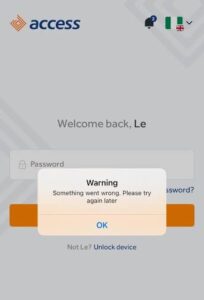
- Bank Server Downtime or Maintenance: Access Bank occasionally performs system upgrades or maintenance, which can temporarily shut down mobile services. During such periods, the app may not open or may fail to complete transactions.
- Poor Internet Connection: A weak or unstable network is one of the most common reasons the app won’t load. Mobile banking apps require a stable connection to communicate with bank servers
- Outdated App Version: Using an old version of the app can cause compatibility issues, bugs, or login failures. Banks frequently release updates to fix errors and improve security
- Cache and Data Build-Up: Over time, cached files can become corrupted, leading to app crashes, blank screens, or failure to open.
- Device Compatibility Issues: If your phone’s operating system is outdated or incompatible with the latest app version, the app may fail to launch properly.
- Incorrect Login Details or Account Issues: Entering wrong login credentials repeatedly can lock your account temporarily. In some cases, account restrictions may also prevent access.
How to Fix Access Bank App Not Opening
- Check Your Internet Connection: Switch between mobile data and Wi-Fi to see if the issue is network-related. A stronger connection often resolves loading issues immediately.
- Update the App: Go to Google Play Store or Apple App Store and update the AccessMore app to the latest version. Updates fix bugs and improve performance.
- Restart Your Phone: Sometimes, a simple restart refreshes your device and resolves background glitches affecting the app.
- Check for System Updates: Ensure your phone’s operating system is up to date. Banking apps often require newer OS versions for security reasons.
- Wait If It’s a Bank Issue: If the problem is from Access Bank’s server (especially during maintenance), there’s little you can do except wait until services are restored.
- Contact Customer Support: If all else fails, reach out to Access Bank customer care via their official channels for assistance, especially if your account is restricted.
Tips to Avoid Future Issues
- Always keep your banking app updated
- Avoid using unofficial or modified app versions
- Use a stable internet connection
- Regularly clear cache to maintain performance
Conclusion
When the Access Bank app is not opening, the cause is usually something simple network issues, outdated software, or temporary server downtime. While it can disrupt your financial activities, most problems can be fixed within minutes by updating the app, clearing cache, or checking your internet connection. In cases where the issue is from the bank’s end, patience is key, as services are usually restored after maintenance or technical fixes.












Comments