
Common Access Bank Error Codes Explained

Banking today in Nigeria is more digital than ever from using USSD codes on basic mobile phones to mobile apps and POS terminals. But sometimes you’ll get an error message or code instead of a successful transaction. When that happens, understanding what the error means can save time, stress, and sometimes money.
This article focuses mainly on Access Bank Nigeria Plc, one of Nigeria’s largest banks, and explains common error codes and messages you might see when using services like USSD banking (*901#), ATMs, POS terminals, or mobile banking.
What Are “Error Codes”?
Whenever you perform a bank transaction electronically whether via USSD, ATM, mobile app, or point-of-sale (POS) the bank’s systems evaluate the request and respond with either a success message or an error.
In many systems worldwide including Nigeria’s banks use a set of response codes based on international messaging standards (like the ISO 8583 standard used for authorization messages) to explain transaction outcomes.
Access Bank USSD Errors and What They Mean
If you’re using Access Bank’s popular USSD service (*901#) which allows transfers, airtime purchases, bill payments, balance checks, etc. you might encounter common error messages even when the bank doesn’t display a numeric code.
Here are typical ones and what they usually mean:
- “Transaction Failed” Cause: This message is a generic indicator that the transaction couldn’t be completed. It may happen because of:
- Weak phone network
- Incorrect USSD formatting
- Insufficient account funds including fees
- Server or bank system delay
Solution:
- Check your account balance and network signal,
- retry the correct code format, and if the problem persists, contact Access Bank customer care.
- “Wrong PIN / Incorrect PIN Entered” Cause: You entered the wrong USSD PIN. Solution:
- If you forget your PIN, dial *901# again and choose the option to reset or change it.
Repeat wrong PIN entries can lock you out temporarily.
- “You do not currently have access to this service” Cause: This can occur when:
- Your phone number isn’t registered with your Access Bank account.
- There is a problem connecting through your telecom network.
Solution: - Ensure the number you’re using is linked to your bank account. If not, visit a branch or call customer care.
Bank Response / Transaction Error Codes (Numeric)
When transactions go through bank systems especially during inter bank transfers, ATM withdrawals, or POS payments numeric error/response codes are sometimes returned. These codes are standardized across Nigerian banking (and often beyond) but are not unique to Access Bank.
Here are some frequent codes and what they mean:
- Code (00) which means Approved transaction completed successfully No action needed (successful).
- Code (05) which means Do Not Honor , the bank didn’t approve the payment Check funds, card status or contact bank.
- Code (06) Which means Dormant Account , You may not be able to transact until the account is reactivated.
- Code (07) Which means Invalid Account , The beneficiary account number may be incorrect.
-
Code (08) which means Account Name Mismatch, The name doesn’t match the account number.
-
Code (12) Which means Invalid Transaction, Something in the request format was wrong.
-
Cold (13) which means Invalid Amount, Check if amount format is correct.
-
Code (14) which means Invalid Account Number, Possibly typo in account number.
-
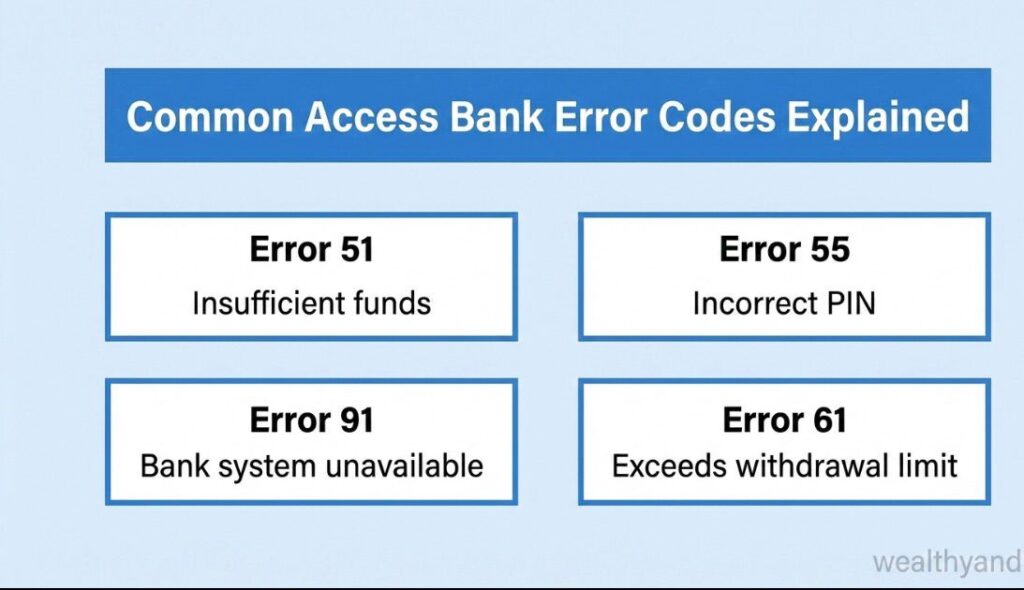
Code (51) Which means Insufficient Funds, Ensure the account has enough balance.
-
Code (57) Which means Transaction Not Permitted to Sender, Account restrictions may block the operation.
-
Code (61) Which means Transfer Limit Exceeded, Daily or per-transaction limit reached.
-
Code (96) Which means System Malfunction, Server or network issue try again later.
These codes originate from the banking and payment systems that Nigeria’s banks connect to (like NIBSS and NIP) and they are the backbone of how banks communicate outcomes electronically.
ATM & POS Errors Related to Access Bank
Sometimes you may use an Access Bank debit card at an ATM or POS and get error codes or messages like:
- Dispense Error / Non-dispense : ATM didn’t give you cash even though your account may have been debited. Solution:
- Report with your receipt to Access Bank within a few days. You may get a reversal after investigation.
- POS Decline Codes : Often numeric (like 05) telling you the transaction was declined by your bank.
These usually require calling Access Bank or trying again.
When to Contact Access Bank Support
If an error persists or you’re unsure what it means:
Access Bank Complaint & Support channels:
- Phone: 0700-300-0000 / 01-2802500 / 01-2712005-7
- Email: contact [email protected]
- Ombudsman: [email protected]
- WhatsApp Banking: 09090901901
Always have details such as your
- transaction reference number,
- amount, and
- date when reporting.
Conclusion
Understanding what Access Bank error codes and messages mean can take a lot of the frustration out of banking, especially when you’re trying to send money quickly or pay for something important.
By recognising common messages like “Transaction Failed”, PIN errors, or numeric codes like 05 (Do Not Honor) and 51 (Insufficient Funds), you can act faster and know when to ask for help. When in doubt, always contact Access Bank support with your transaction details.










Comments