
Common Zenith Bank Error Codes


Banking today is fast, digital, and largely automated — but even the most advanced systems occasionally throw errors that can be confusing and frustrating. Whether you’re withdrawing cash, making a transfer, paying bills online, or logging into mobile or internet banking, encountering an error code can leave you wondering “What does that mean?” or “What should I do next?”
Error codes and messages are part of how modern banking systems communicate technical issues. They can be triggered by:
- Incorrect input such as wrong PIN or account number
- Insufficient funds
- Your bank’s risk or fraud detection systems
- System downtime or connectivity issues
- Transaction limits or restrictions
While the codes may look cryptic, most are based on standardized banking response codes that tell you, or your bank, what went wrong so the issue can be fixed.
Common ATM & Card Error Codes
00 — Approved / Successful: This is the best message to see! It means your transaction (withdrawal, balance enquiry, transfer, etc.) was completed without any issues.
05 — Do Not Honor: This is one of the most common decline messages. It indicates the bank did not approve the transaction. Typical reasons include:
- Temporary risk control holds
- Unusual transaction activity
- Bank server rejecting without detailed explanation
What to do:
- Try again after a few minutes
- Confirm sufficient balance
- Contact customer service if repeated
Invalid Transaction: This code appears when the transaction type isn’t supported or recognized by the system. Example: A transfer request formatted incorrectly.
What to do:
- Check you selected the correct transaction type
- Retry carefully
Invalid Account/Card Number: If you see this, it usually means you entered a wrong account or card number, or the card is not recognized by the bank.
What to do:
- Re‑check the account or card number
- If the issue persists, contact Zenith Bank
51 — Insufficient Funds: This means your account doesn’t have enough funds to complete the transaction. Always ensure you have sufficient available balance before performing transactions.
57 — Transaction Not Permitted: This often means the bank has blocked that specific transaction, possibly for security reasons or because your card doesn’t allow that type of transaction (for example, an international transaction).
What to do:
- Call Zenith Bank customer care to lift restrictions
- Use another channel if needed
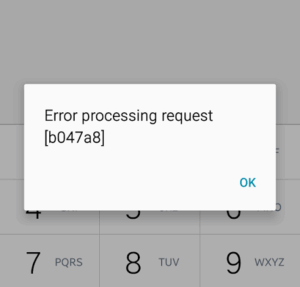
Exceeds Withdrawal/Transfer Limit: Every Zenith Bank card and account has daily limits on withdrawals and transfers. Once exceeded, this error can occur.
What to do:
- Wait until the next day for the limit to reset
- Request temporary increase via the bank
Security Violation: This is a flag for possible data inconsistency or security concerns.
What to do:
- Avoid repeating similar attempts
- Contact customer support immediately
- service Unavailable: This message indicates Zenith Bank’s system or payment network is temporarily down or unreachable.
What to do:
- Wait and retry later
- Check if network or ATM provider issue
System Malfunction: This is a general error indicating a problem within the bank’s processing system.
What to do:
- Retry after some time
- Contact customer service if persistent
Zenith Bank Internet & Mobile Banking Messages: In addition to numeric codes, you may see descriptive error messages when using Zenith Bank’s internet or mobile banking platforms.
Some of the common examples include:
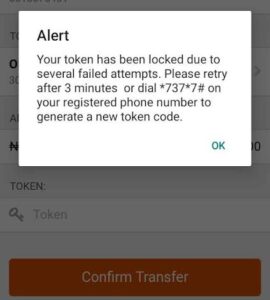
- Token is locked: Occurs when your authentication token (hardware or software) has been locked due to multiple incorrect entries.
Fix: Contact Zenith Bank via email or call center to unlock/reset the token.
- Forgot login details: This happens when a customer can’t remember their username or access details.
Fix: Follow the bank’s recovery steps via customer care or email.
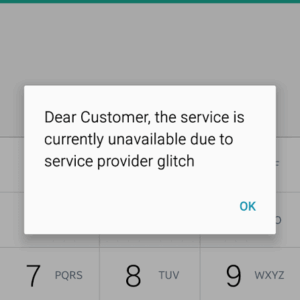
- Session expired/ Service temporarily unavailable: These are standard session and availability notifications. They usually occur during system updates or due to connectivity issues.
Fix: Retry after a few minutes or check your internet connection.
- General Login Errors: If the banking portal or app repeatedly fails without clear codes, the problem could be:
- Incorrect login details
- Poor internet connection
- Server downtime
Always ensure you use the official Zenith Bank login pages to avoid phishing attempts.
What to Do When You See an Error
Seeing an error code or message can be unnerving, but most issues can be resolved quickly if you take the right steps:
- Double‑check Input: Whether it’s your PIN, account number, or transaction amount, always ensure you enter accurate information.
- Wait and Retry: In many cases some problem are temporary.
Safety Tips to Prevent Errors: While some errors are genuinely technical, others are avoidable with good security hygiene:
- Never share your PIN, OTP, or token codes.
- Always confirm you are on the official Zenith Bank app or website.
- Avoid re‑trying a failed transaction multiple times; this can trigger security blocks.
- Report unusual activity quickly through customer support
Read Also: Complete Guide To Failed Bank Transactions In Nigeria
Conclusion: Understanding Zenith Bank error codes is essential for anyone navigating digital banking in Nigeria. These codes are not random; they are structured responses designed to indicate exactly what went wrong during a transaction. Codes such as 51 (Insufficient Funds) and 61 (Exceeds Withdrawal Limit) give clear signals about account limitations, while codes like 05 (Do Not Honor) or 57 (Transaction Not Permitted) highlight security or transaction restrictions. Recognizing what each code means empowers customers to act quickly, whether it’s rechecking account balances, retrying a transaction later, or contacting Zenith Bank’s customer support.
In addition, familiarizing yourself with common internet banking and mobile app messages — such as “Token is locked” or “Session expired” — reduces unnecessary panic when digital banking services appear unresponsive. Most of these issues are temporary, often related to system maintenance, network issues, or simple input errors.
Combining this knowledge with safe banking practices—such as using official channels, safeguarding PINs and tokens, and monitoring account activity—ensures that users are both informed and protected, ultimately enhancing the overall banking experience.











Comments