
How To Check Your Account Tier

Know Your Financial Level — Why Account Tier Matters
In today’s digital banking era, your account tier determines what services you can access from transaction limits and loan offers to international transfers and higher savings interest.
Whether you’re a regular salary earner, a small business owner, or someone building a financial profile, knowing your account tier empowers you to plan better, avoid transaction problems, and maximize your bank’s benefits.
In Nigeria, most banks classify customers into different tiers based on factors like identity verification (KYC), account activity, balance history, and documentation submitted.
These tiers affect your daily limits, eligibility for certain products, and even your ability to fully use online banking features.
This article explains what account tiers are, why they matter, and the most reliable ways to check your account tier.
What Is an Account Tier?
An account tier is simply a level assigned to your bank account based on how fully your identity and documentation have been verified by your bank. Banks use this tier system to comply with regulations and to manage risk.
What Typically Influences Your Account Tier
- Know Your Customer (KYC) Verification (e.g., BVN, valid ID, proof of address)
- Account Usage and Activity
- Account Balance History
- Submission of Additional Documentation (e.g., business documents)
Higher tiers often come with:
- Higher transaction limits
- Access to loans and overdrafts
- Higher savings and investment options
- International transfer privileges
Lower tiers usually have restrictions, especially on daily transfer and withdrawal limits.
Why Knowing Your Account Tier Is Important
Knowing your account tier helps you:
- Avoid failed transactions due to limits
- Plan upgrades to access more services
- Understand why some features are unavailable
- Improve your banking experience
For example, a Tier 1 account (basic) may let you withdraw or transfer small amounts daily, whereas a Tier 3 account (fully verified) may allow larger transfers and access to premium offers.
How to Check Your Account Tier — Step by step
Here are the most common and reliable ways to check your bank account tier in Nigeria:
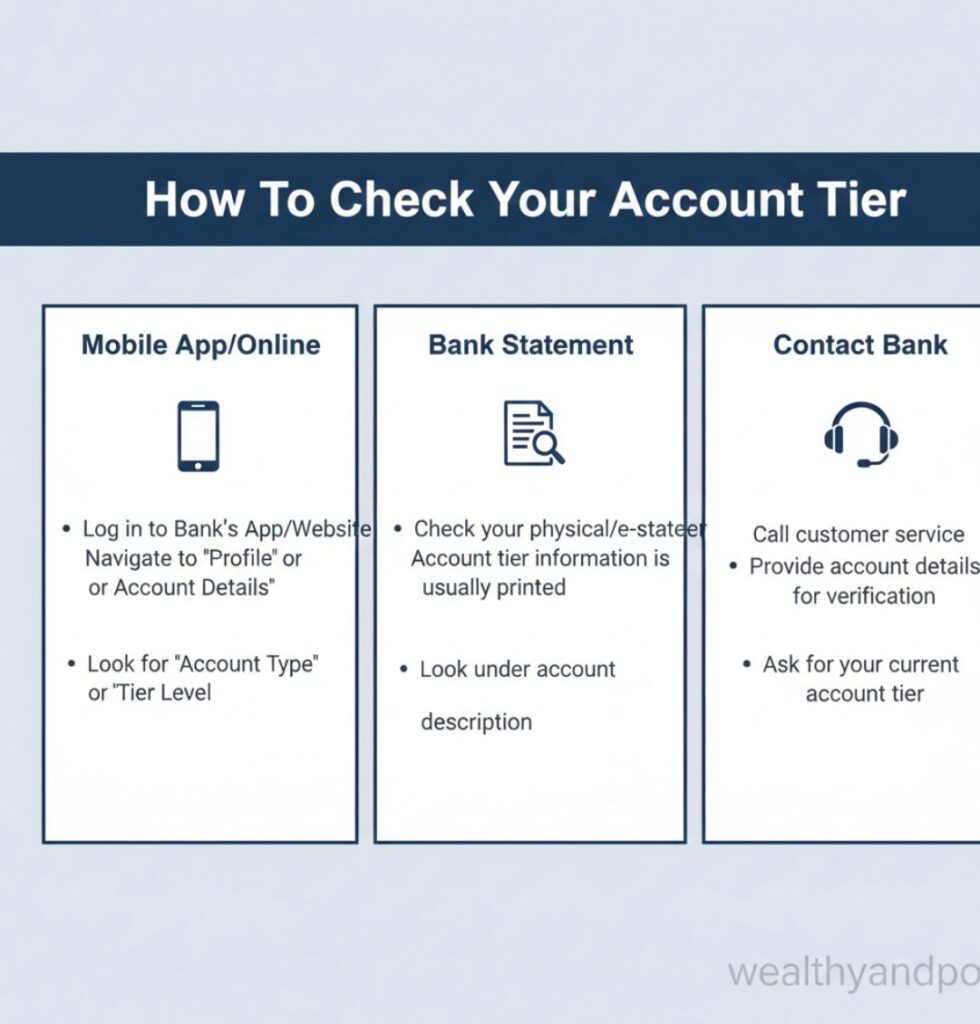
Via Mobile Banking App
Most Nigerian banks display your account tier directly in their mobile app.
Steps:
- Open your bank’s mobile app (e.g., GTBank, Access Bank, Zenith Bank).
- Log in securely with your credentials.
- Go to “Profile,” “Account Settings,” “My Account,” or “Account Details.”
- Look for a section labeled “Account Tier,” “Verification Level,” or “Verification Status.”
Example banks and apps where this is available:
GTBank Mobile App
Zenith Bank Mobile App
Access Bank Mobile App
Using USSD Banking
If you use *USSD services (e.g., *737#, *901#, *945#), many banks allow you to check your account tier.
Typical USSD Check (may vary by bank):
- Dial your bank’s USSD code (e.g., *737# for GTBank, *955# for Fidelity).
- Choose Account Settings or Account Status.
- Select Check Account Tier / Verification Level.
This method is fast and works without internet.
Internet (“Online”) Banking Portal
If you have a bank’s internet banking account:
- Log in at the official website.
- Navigate to Profile or Account Information.
- Look for Account Verification Level / Account Tier.
Many banks include your tier under personal information or KYC status.
Contact Customer Support
If you can’t find it via app or USSD:
- Call your bank’s customer care line.
- Provide BVN and account number.
Ask: - (“Can you tell me my current account tier and what documents I need to upgrade?”)
This is especially useful if your bank has recently updated its policies.
Visit a Branch
If your account lacks documentation:
- Visit the bank branch with valid ID, proof of address, BVN slip.
- Ask a representative to check your account tier and advise how to upgrade.
How to Upgrade Your Account Tier
Typical Documents Required
- Valid Government-Issued ID (Driver’s License, National ID, International Passport)
- Proof of Address (Utility bill, tenancy agreement)
- Active Phone Number
- BVN Linked
- Completed Bank Forms (most banks provide at branches)
- Upgrade Options
- Submit through Mobile App: Some banks now allow upload of documents via app.
- USSD Upgrade Option: A few banks include document submission steps via USSD.
- Visit a Branch: Still the most reliable for full verification.
Once your documents are submitted and verified, your account tier should update within a few business days.
What If You Can’t See Your Tier or It Says “Incomplete”?
If your app or USSD shows “Incomplete” or “Unverified”:
- You likely need to upload missing documents.
- Contact customer care immediately.
- Visit the bank branch with all valid documentation.
Final Tips for Nigerian Account Holders
- Always link your BVN to your account.
- Keep your phone number and email updated.
- Complete KYC documentation early it saves time later.
- Regularly check your tier, especially before large transactions.
Knowing your account tier prevents frustration at ATMs, online platforms, and during transfers.
Conclusion
Checking your account tier isn’t complicated, but it’s essential for smooth banking. Whether through your mobile app, USSD code, internet banking, customer support, or a branch visit, knowing your tier gives you confidence and control over your finances.
Upgrade proactively. Banking with knowledge keeps you a step ahead.











Comments