
What Documents Banks Accept for Account Upgrades

Why Account Upgrades Matter
Opening or maintaining a bank account is just the beginning. Over time, banks may ask you to upgrade your account not because they want to make life difficult, but because regulations change, security standards improve, and your financial footprint evolves.
Upgrading an account could mean converting a basic account to a premium or business account, updating your Know Your Customer (KYC) profile, or simply providing updated documentation that reflects who you are today. It’s about trust, transparency, and financial inclusion.
But here’s the twist: banks don’t all ask for the same things. Some require a laundry list of documents, others accept flexible proof.
This article explains what documents banks typically accept in a clear, practical way.
Identity Verification
The Most Important Step your identity must be confirmed when you ask a bank to upgrade your account. This protects you and prevents fraud.
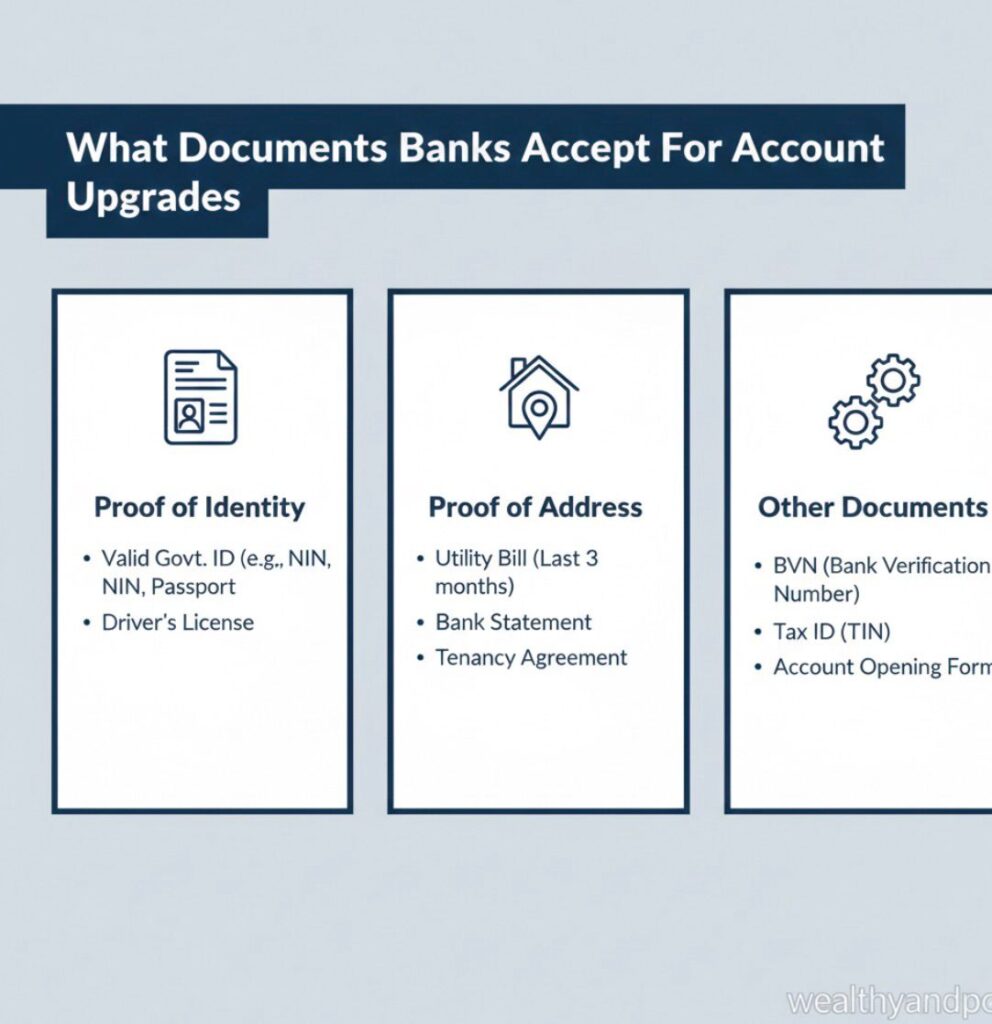
Common Documents Accepted
Banks typically accept government issued IDs, such as:
- Passport (internationally accepted)
- Driver’s License
- National Identity Card
- Voter’s Card
- Social Security Card (in some countries like the United States)
Permanent Resident Card / Residency Permit
Most banks require the ID to be valid (not expired) and clearly legible if scanned or photocopied.
Note :If you want to learn more about identity requirements, the Financial Action Task Force provides global guidance on KYC standards:
Proof of Address
A Close Second , Another core requirement is proof of where you live. Banks use this to ensure contact accuracy and comply with regulatory requirements.
Documents Usually Accepted
A proof of address should clearly show:
- Your full name, and
- Your current residential address
Common proofs include: - Utility Bills (electricity, water, gas)
- Bank Statements
- Telephone or Internet Bills
- Tenancy Agreement / Rent Receipt
- Local Government Tax Receipt
Most banks require that the document is recent usually within the last 3 months.
Proof of Income or Source of Funds
When upgrading to accounts that support credit limits, loans, or large transactions, banks may ask for proof of how you earn money.
Documents Accepted as Proof of Income
Depending on your employment type:
If You Are Employed
- Salary Slips (3–6 months)
- Employment Letter
- Tax Returns
If You Are Self-Employed
- Business Registration Documents
- Invoices or Contracts
- Audited Financial Statements
If You Are a Student
- Student ID + Sponsor’s Proof of Funds
- Scholarship Letters
- Allowance Statements
Proof of funds helps banks assess risk and ensure anti money laundering compliance.
Additional Documents for Special Upgrades
If your upgrade includes international transfers, business operations, or high-value transactions, banks may require more:
For Business Accounts
- Certificate of Incorporation
- Business Registration Documents
- Board Resolution (naming account signatories)
- Tax Identification Number (TIN)
For Joint Accounts
- IDs of All Parties
- Sign-On Agreements
For Students or Youth Accounts
- Student IDs
- Parent/Guardian Consent (where required)
For students, banks often have simplified requirements to encourage financial inclusion.
Electronic Submission vs. Physical Submission — What’s Accepted
Banks differ in how they accept documents:
- Digital Channels
- Upload via mobile app
- Upload through online banking
- Email to bank customer service
- Upload on bank’s secure portal
- In-Branch Submission
- Physical copies
Certified photocopies
Originals for verification (often returned)
Always check the bank’s official policy many now prefer digital uploads to reduce workload.
What Banks Will Not Accept
To avoid delays, don’t submit:
- Hand-written receipts
- Expired IDs
- Misaligned or incomplete documents
- Screenshots of IDs with missing edges
Always review the bank’s list before submission.
Tips to Speed Up the Process
- Prepare good scans: high resolution, straight, and clear
- Use the exact name registered on your account
- Check validity dates
- Call customer support if unsure
Document Checklist Requirement
Typical Documents Accepted
Identity
- Passport, Driver’s License, National ID
- Address
- Utility bill, Bank statement, Rent
- receipt
- Income
- Payslips, Tax returns, Business reports
- Business registration, TIN, Board resolution
Special Cases
Student ID, Joint account signatures
Conclusion
Keep It Simple, Keep It Updated
Upgrading a bank account doesn’t have to be stressful. Knowing what documents banks generally accept and why they ask for them empowers you to act confidently and efficiently.
Remember, every bank has its own policies and procedures, so it’s always a good idea to check your bank’s official documentation or contact customer service before you submit anything.
the goal is always the same which is to confirm your identity, verify where you live, and ensure your account details are current and compliant with regulations.










Comments