
Why Your Bank App Is Not Working Today


In Nigeria, mobile banking apps have become the backbone of personal and business finance. From transferring money, paying bills, and buying airtime to monitoring transactions, apps from banks like GTBank, Zenith Bank, Access Bank, and UBA have made banking faster and more convenient. However, a common frustration many Nigerians face is when their bank app suddenly stops working.
Whether it’s a busy salary day, a late-night transfer, or a routine payment, encountering a non-functional banking app can disrupt your financial plans. Sometimes your account is debited while the transaction fails, or you may receive cryptic error codes with no explanation. This can be stressful, especially if you rely on these apps for urgent payments.
System Downtime or Maintenance: One of the most frequent reasons your bank app fails is scheduled or unscheduled system maintenance. Banks regularly update backend systems to improve security, add features, or comply with regulatory changes. The downtime can result too.
- App fails to open
- Transactions cannot be completed
- Pages load indefinitely
What to do:
- Check official bank social media accounts for updates
- Wait a few hours and try again
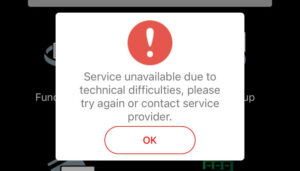
Failed Bank Transactions & Pending Transfers: Even if your app opens, transactions can fail or remain pending. Common causes include:
- NIBSS downtime: Nigerian banks rely on the Nigeria Inter-Bank Settlement System to clear interbank transactions. Downtime here can delay transfers.
- High transaction volume: Salary days or festive seasons can overload bank servers.
Fixes:
- Wait 30–60 minutes and recheck your transaction
- Confirm transaction reference numbers
Contact customer support if the transaction remains pending.
Poor Internet Connection or Network Issues: Bank apps require stable internet connections. Weak data or unstable Wi-Fi can cause:
- Endless loading screens
- “Network error” messages
- Failed transfers
Quick solutions:
- Switch between mobile data and Wi-Fi
- Restart your phone
- Move to an area with stronger coverage
- Incorrect Login or Account Lockouts
- Multiple failed login attempts may trigger temporary account locks for security.
Signs:
- “Account locked” notifications
- Inability to log in despite correct credentials
Solution:
- Use the “Forgot Password” feature
- Contact customer care to unlock your account
Security or Fraud Prevention Blocks : Banks monitor unusual activity. If suspicious transactions are detected, your app access may be restricted.
Triggers include:
- Logging in from a new device
- Sudden high-value transfers
Action:
- Verify your identity with your bank
- Follow prompts to restore access
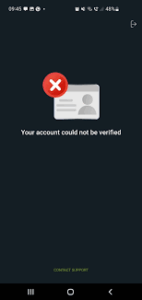
BVN or KYC Issues: The Bank Verification Number (BVN) must be correctly linked to your account. Issues here can prevent app login and transactions.
Common problems:
- BVN not linked properly
- Mismatch between BVN and bank records
Solution:
- Ensure your BVN and NIN are updated
- Visit a branch if mismatches exist
- USSD Transfer Failures Despite Debits
Sometimes USSD transactions fail while debiting your account due to session timeouts or routing errors.
What to do:
- Wait 15–30 minutes before retrying
- Check SMS alerts or bank statement
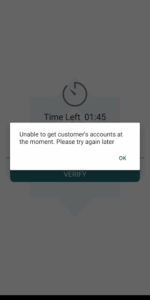
Failed POS Transactions & Reversals: POS transactions may fail while your account is debited. Commercial Banks in typically reverse such debits automatically within 24–72 hours.
Action:
- Keep POS receipts and debit alerts
- Contact the bank if reversal doesn’t reflect
- ATM Dispensed No Cash but Debited
Even if your app seems fine, failed ATM withdrawals affect trust. Banks must refund failed ATM transactions within 24–48 hours.
Steps to resolve:
- Keep ATM slips and SMS alerts
- Contact the bank promptly
- Legacy Systems and Overload
Some Nigerian banks operate legacy systems. When millions of users log in simultaneously, the system can slow or crash.
Tips:
- Use the app during off-peak hours
- Temporarily switch to USSD or ATM channels
- Regulatory or Scheduled Downtime (Sundays/Nights)
Banks often perform maintenance during late nights or Sundays, during this time:
- Transfers may remain pending
- Some app features may be temporarily unavailable
Error Codes : Bank apps sometimes display error codes instead of clear messages.
Common codes:
- GTBank X00024: Network or server connection issue
- Zenith Bank codes: Authentication or routing problems.
Immediate Actions If Your Bank App Fails
- Confirm your internet connection
- Restart the app and your phone
- Update the app to the latest version
- Check the bank’s social channels for outages
- Review transaction status and save reference numbers
- Report issues via the bank’s hotline or complaint portal
When to Seek Help
Contact your bank or the Central Bank of Nigeria Consumer Protection Department if:
- Debited funds are not refunded within regulatory time-frames
- Unexplained charges appear
- You cannot log in after resetting credentials.
Read Also: Complete Guide To Failed Bank Transactions In Nigeria
FAQs
Q1. Why is my bank app not working today?
It could be due to system maintenance, network issues, app updates, or security restrictions.
Q2. What should I do if a transaction fails but my account is debited?
Check your transaction reference, wait 24–72 hours for reversal, and contact your bank if funds are not restored. It
Q3. How do I fix login issues on my bank app?
Use the “Forgot Password” feature or contact customer support to unlock your account.
Q4. Can poor internet affect my bank app?
Yes, unstable Wi-Fi or mobile data can prevent the app from loading or completing transactions.
5. Why do I see error codes on my bank app?
Error codes indicate issues like network failure, authentication problems, or transaction routing errors. Contact your bank for clarification.
Q6. How can I prevent my bank app from failing?
Keep the app updated, maintain stable internet, verify BVN/KYC details, and avoid peak transaction times.
In Conclusion: If your bank app is not working today in Nigeria, the causes are usually temporary: system maintenance, network problems, BVN/KYC mismatches, USSD/POS reversals, or app updates. Most issues resolve within hours to a few days.
Proactively planning your transactions can also reduce the likelihood of encountering issues. For example, avoid transferring funds during peak hours or late-night maintenance windows, and ensure your banking app is regularly updated to the latest version. Using alternative channels such as USSD, ATMs, or web banking can provide temporary solutions when the mobile app is unavailable.










Comments